How to Organize Homeschool Curriculum
Some links in this post may be affiliate links. That means I might make a small commission on qualifying purchases if you click the link. There is no extra cost to you.
If your homeschool feels like a paper tornado — piles of workbooks, graded papers stacked everywhe, and a dozen little notebooks for four kids — you’re not alone. Workbook‑heavy curricula and multiple students make organization a real challenge. This post lays out a practical, repeatable system that scales: magazine boxes for active work, color‑coded folders for each student, a daily basket for morning work. No fancy furniture or endless scrapbooking — just what works for busy homeschool families.

Why Organization Matters for Workbook-Based Curriculum
A curriculum made of dozens of workbooks is powerful: it breaks learning into manageable chunks, keeps lessons consistent, and makes tracking progress straightforward. But without a system, the paper trail multiplies. Good organization:
- Saves lesson prep time
- Reduces lost materials and duplicate purchases
- Makes transitions between students smooth
- Keeps records ready for transcripts, co-ops, or portfolio reviews
The Core System — What You’ll Need This method is inexpensive, fast to set up, and easy to maintain.
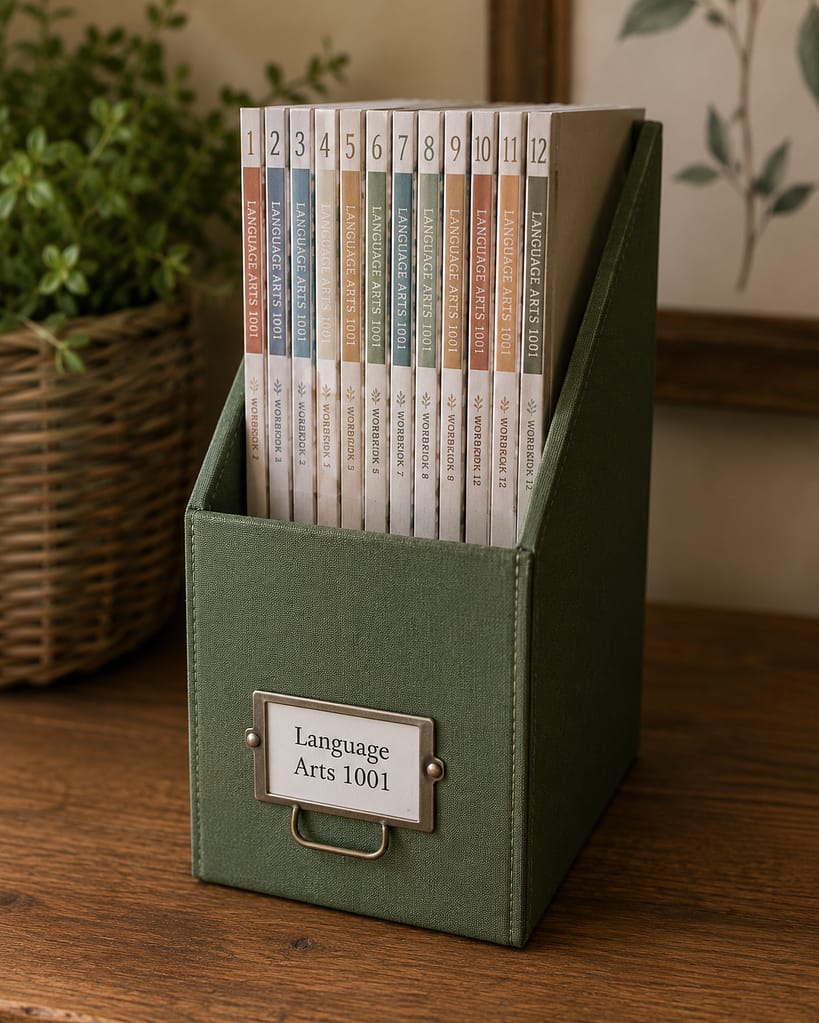
- Magazine boxes (one per subject per student)
- File folders or Additional magazine box (for completed work and graded papers)
- A daily basket or bin (for busy work, tests awaiting grading, etc)
- A simple binder or spiral notebook in each students color for grades, notes, records
- A small shelf or cart to keep boxes within reach
Step‑By‑Step Setup (30–60 minutes per student)
1. Gather every workbook, teacher guide, and student book
Do a quick inventory. Put everything from one curriculum into one place so you can see what you actually own. Photograph or note ISBNs for easy repurchasing if you want to be prepared.
2. Assign one magazine box color per student
Option A — Per student: Use one box for each child and add simple internal dividers (with sticky tabs) for subject areas (math, language arts, science, history). Option B — Per subject (best if you have many students using the same curriculum): Use one box per subject per grade level — this works well for multiple students using the same math or grammar series.
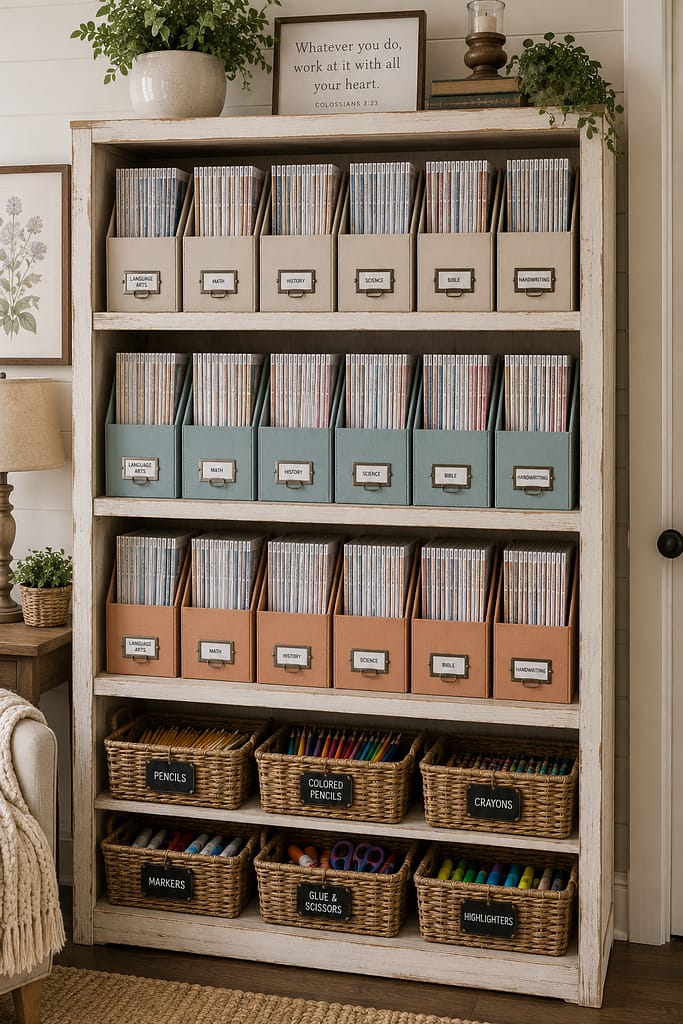
We use 6 green boxes for our 6th grader, 6 blue magazine boxes for our 9th grader, and 4 tan magazine boxes for our elementary grades. There is a box for each core subject, plus a box for score keys.
3. Label clearly and color‑code
Choose a color for each student (red, blue, green, linen) and use that color on labels for folders, boxes, and the spine of their binders. Keep this color consistent across all of their school work. Add subject initials to each label (M for Math, LA for Language Arts) for fast visual scans.
4. Create a DAILY basket
Keep a small basket for unsupervised morning work, pleasure reading books, and even an inbox for the current day’s assignments. When you plan lessons, place that day’s workbook pages, reading materials, and any printables in the tray. This tray moves from parent desk to kitchen table and back.
5. Use a “Done” folder for each student
When work is finished and graded, students put pages in their Done folder. This will be a collection of records for quiz, test, and report grades.
6. Archive with hanging files
Once schoolwork is graded or a unit is complete, move it to a dated hanging folder labeled by year and subject. Keep one archival box per student per year. This makes portfolios and transcripts simple to assemble.
Daily & Weekly Workflow (make it frictionless)
Morning — Quick checklist (5 minutes)
- Pull the daily basket and confirm materials for each student.
- Work through the lesson plan for the day, pulling workbooks from magazine boxes as needed.
- Students place completed work into their Done folder.
Afternoon — Tidy & Grade (15–30 minutes)
- Empty Done folders and do quick grading or spot checks.
- Move finished pages to the hanging file archive.
- Refill daily trays for tomorrow.
Weekly — Planning & Refill (30–45 minutes)
- Print nay resources. Replenish the daily trays for the coming week.
- Note any missing materials or supplies. Restock as needed.
- Update the master planner or digital tracker with completed units and next steps.
Handling Multiple Students with the Same Curriculum
If you teach several students with workbook sets (common with ACE-type PACE systems or multi-level boxed curricula), this approach scales:
- Keep one subject box per grade level with labeled dividers for each student’s workbook. Students pull only their own pages into the daily tray.
- Alternatively, duplicate the daily tray system for each student if space allows — it speeds independent work time and reduces “where is mine?” arguments.
- For shared resources (science kits, manipulatives), use a central shelf labeled by subject and a sign‑out system if needed.
Tips for Large Homeschool Rooms or Small Spaces
- Use a rolling cart for daily trays to move from room to room.
- Store archived hanging folders in plastic file boxes under a bed or on a high shelf.
- For small spaces, vertically stack magazine boxes and keep the most active student on the lower shelf.
Record Keeping & Transcript Tips (less work, more accuracy)
- Keep a simple binder per student with: attendance log, reading log, graded samples, and a one‑page summary for each semester.
- Use the hanging file archive as your graded work bank — pull the best samples into the binder monthly.
- At year end, create a one-page summary (courses, hours, grade/notes) that feeds directly into transcripts.
Labeling & Visuals — Make It Obvious
- Labels should be large, high contrast, and consistent. Example format: [Name] — MATH — 5th.
- Use a consistent label location (upper left front of magazine box) so students always place items in the same spot.
- Consider adding a small printed “how to use this box” note inside each box for younger students.
Troubleshooting Common Pain Points
- “My kids don’t file.” Make filing part of the routine: five minutes at the end of each block. Offer small incentives or a sticker chart for consistency.
- “Pages get lost.” Use a clipboard or folder for open pages in each tray so loose papers aren’t scattered.
- “I can’t find the teacher guide.” Keep teacher guides in the box with a sticky tab labeled “Teacher Guide” and optionally place one copy in your planning binder for quick reference.
- “Transcripts are a headache.” Do one‑page summaries quarterly to avoid year‑end panic.
Simple Supplies Shopping List
- 1 magazine box per child (or per subject)
- Hanging file box with folders (one per subject/year)
- Small daily trays or shallow bins (one per student)
- Label maker or printable labels
- Clipboards and basic school supplies (pencils, erasers, highlighters)
- Rolling cart (optional but helpful)
Sample Setup — Real Family Example
- Mom uses color-coded boxes: Blue = Emma (grades 1–2), Green = Noah (grades 3–4), Yellow = Shared Math box for both.
- Each morning, students work on their morning basket independently. When school time officially starts, the students pull the current workbook from their color coordinated magazine box.
- Finished pages go into Done folders and are graded after lunch; the best samples move to each child’s binder weekly.
Digital Tools That Complement the System
- A simple spreadsheet tracks lesson completion, hours, and books read.
- Use a shared calendar (Google Calendar) for block scheduling and co‑op dates if needed
- If you prefer digital planning, apps like Trello or Notion can mirror your physical system with columns for To Do, Doing, and Done.
How to Scale the System for Co-ops & Large Families
- For co-op classes, keep one subject box with student name tabs and handouts pre-cut into labeled packets per student.
- For large families, assign older students responsibility for their own trays and folders as part of leadership training.
Hope Chest & Portfolio Building (use your archive intentionally)
Pull two to four high-quality samples per subject into a portfolio binder at year end — this demonstrates progress and skill.
Save polished projects for the hope chest: a set of embroidered napkins, a hand‑stitched apron, or a baby quilt.
Budget Friendly Homeschool Organization
Decorative Homeschool Organization
Frequently Asked Questions
Get one per subject in each color. For example, get 5 green boxes for student 1 and label them math, science, history, reading, and handwriting. For a second student, get 4 blue boxes for reading, writing, history, and math. Get a quantity in each color to match the number of subjects each student is working on.
This system if designed for ACE paces, but also works well for LifePac. If the curriculum is broken up into workbooks with the textbook broken down into the workbooks, this system is great.
Final Encouragement & Next Steps
Organization isn’t glamorous, but it’s the secret muscle behind consistent homeschool days. Start small: set up one student’s box, create a daily tray, and run the routine for a week. You’ll quickly see how the friction falls away and more time opens for teaching, not shuffling paper. If you want, I can create printable labels and a one‑page daily checklist you can print and place inside each magazine box.
Other Homeschool Resources I’ve Shared
- Free Homeschool Unit Study for Science: Building Bridges
- Free Skyscraper Unit Study for Homeschool | Amazing Architecture Series
- Quiet Homeschool Work for Pre-Readers (Free Printable Pack)
- Another Morning Work Book-Teach your preschooler a new habit
